

All Girne American University students are entitled to receive a “Student Email” account, and all students have an email address in the following format: >> name.surname@std.gau.edu.tr <<
With this email address, our students will have access to a Google Drive cloud account without storage limitations. All Google applications are available free of charge for our students.
E-learning Frequently Asked Questions
WHICH ACCOUNT SHOULD I USE WHEN LOGGING INTO E-LEARNING?
You must use your “Student Email” address when logging into the E-learning system. You cannot log in with your personal email address.
HOW CAN I FIND OUT MY STUDENT EMAIL ADDRESS?
To retrieve your Student Email address, please enter your student number below to access your email information.
HOW DO I LOG INTO E-LEARNING?
Please visit the page below and click the Sign in with Google button under the Student Login section.
http://elearning.gau.edu.tr/login/index.php

I RECEIVE AN ERROR MESSAGE WHILE LOGGING IN. WHAT SHOULD I DO?
If you receive an error message as shown in the image below, please follow the steps below.
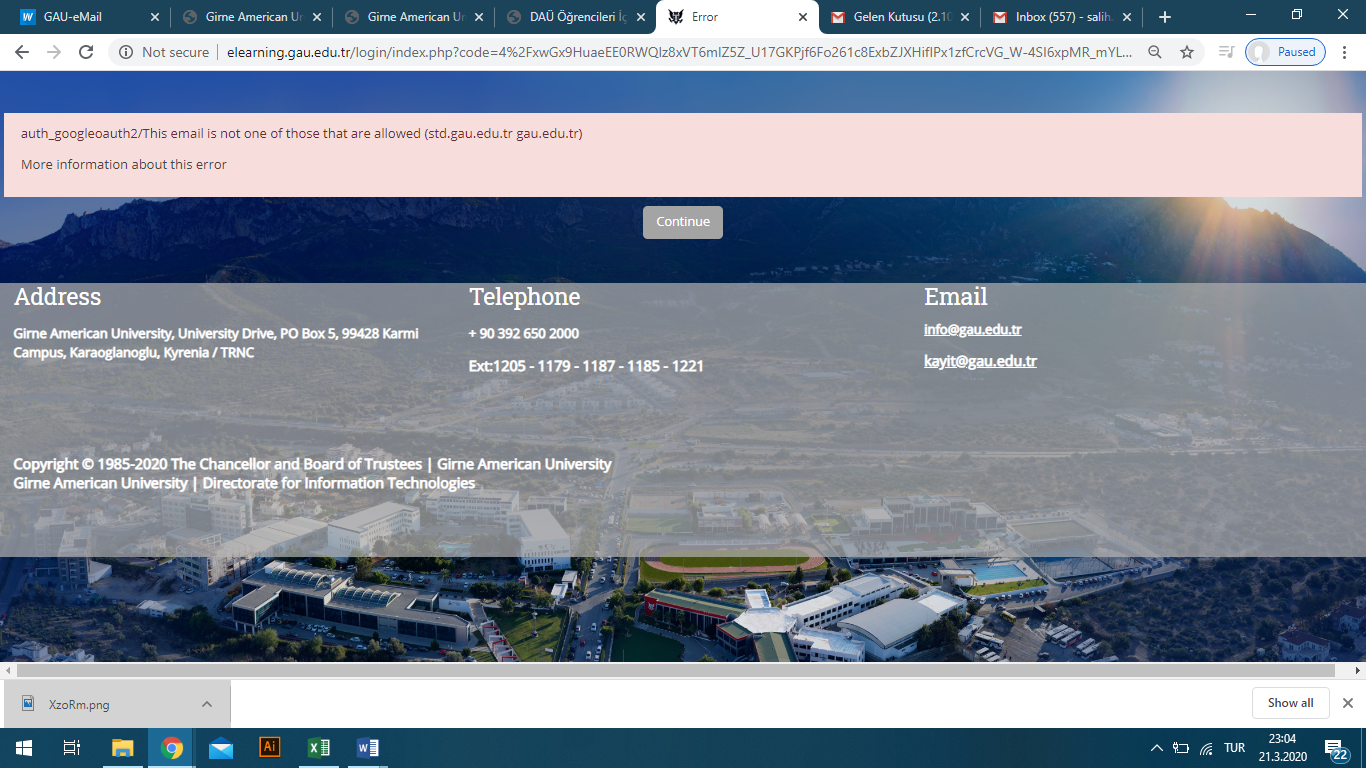
Please click the link below and log in on the page that opens.
https://accounts.google.com/AddSession?hl=en
- Log in by entering your Student Email Address and password.
- Then visit the page below and click the Sign in with Google button under the Student Login section.
http://elearning.gau.edu.tr/login/index.php

IT SAYS “WRONG PASSWORD”. WHAT SHOULD I DO?
First, we recommend that you try the password recovery option using the link below.
THE RECOVERY PROCESS FAILED. WHAT SHOULD I DO?
Please send an email to help@std.gau.edu.tr and include the following information in your message:
- Your full name,
- Your student number,
- Your phone number
and a description of the error message you receive while trying to log in.
I RECEIVE A 2-STEP VERIFICATION ERROR. WHAT SHOULD I DO?
Please visit the link below and follow the instructions.
https://support.google.com/accounts/answer/185839?co=GENIE.Platform%3DDesktop&hl=en
If you continue to experience login issues, please send an email to help@std.gau.edu.tr and include the following information in your message:
- Your full name,
- Your student number,
- Your mobile phone number
and a description of the error message you receive while trying to log in.
I LOGGED IN, BUT I CANNOT FIND MY COURSES. WHAT SHOULD I DO?
After visiting the page below, you can search by course code or course name, or browse the Faculty/School categories.
http://elearning.gau.edu.tr/course/
E-learning Help Documents
You can access the following training documents and videos prepared to help you use the E-learning system more effectively.
BLACKBOARD EDUCATION KIT FOR TEACHERS
A comprehensive instructor guide explaining course management, content creation, assignments, exams and grading processes on Blackboard step by step.
How to Download E-learning Exam Results? (Video)
A training video explaining how to download exam results from the E-learning system to your computer.
How to Download E-learning Exam Results?
A written user guide explaining how to download exam results to your computer in Excel format.
How to Download Exam Grades to the Computer
An English user guide explaining how to download exam grades to your computer.
Need More Help?
For more information or technical support, you may visit our E-learning Center in person or create a support ticket at help.gau.edu.tr.